Python OpenAI
openai 是一个强大的 Python 库,用于与 OpenAI 的一系列模型和服务进行交互。
openai 封装了所有 RESTful API 调用,让开发者能轻松地在自己的 Python 应用中集成强大的 AI 能力,例如自然语言处理、图像生成和语音识别等。
主要功能:
- 文本生成:使用 GPT-4 或 GPT-5 等模型生成文章、代码、摘要、对话等。
- 图像生成:通过 DALL-E 模型根据文本描述创建图像。
- 嵌入(Embeddings):将文本转换成向量表示,常用于语义搜索、文本分类和聚类等任务。
- 语音转文本:使用 Whisper 模型将音频文件转录成文本。
- 微调(Fine-tuning):通过提供自己的数据集来训练一个更具针对性的模型。
- 助手(Assistants)API:构建能够理解上下文、调用工具并进行长期交互的复杂应用。
openai 开源地址:https://github.com/openai/openai-python
如何使用?
环境要求:
- Python 版本:3.9 及以上。
- 依赖库:httpx(默认)、aiohttp(可选)、websockets(Realtime API 需)。
首先,你需要用 pip 安装 openai 库:
pip install openai

或

pip3 install openai
然后需要去 OpenAI 官网 https://platform.openai.com/ 注册账号,并在 API 密钥页面生成一个 API Key。
查看安装版本:
import openai
print(openai.__version__)  # 输出当前 SDK 版本
实例
from openai import OpenAI
client = OpenAI(
# This is the default and can be omitted
api_key="你申请的 API key",
)
response = client.responses.create(
model="gpt-4o",
instructions="You are a coding assistant that talks like a pirate.",
input="How do I check if a Python object is an instance of a class?",
)
print(response.output_text)
参数说明:
| 参数名 | 是否必填 | 类型 | 作用说明 |
|---|---|---|---|
api_key |
是 | str |
申请的 OpenAI key |
model |
是 | str |
指定使用的 OpenAI 大模型,决定能力、推理水平和成本 |
instructions |
否 | str |
系统级指令(System Prompt),定义模型的身份、行为规范和表达风格,优先级高于 input |
input |
是 | str / list |
用户输入内容,描述具体问题或任务 |
第三方模型
我们国内目前访问 openai 还是有点麻烦,国内很多也支持 openai,比如 DeepSeek、千问、GLM。
DeepSeek
DeepSeek API 完全兼容 OpenAI 的 API 格式,只需修改少量配置,即可直接使用 OpenAI SDK 或兼容工具访问 DeepSeek API。
| 参数 | 取值/说明 |
|---|---|
| base_url | 必填,固定值:https://api.deepseek.com(也可填 https://api.deepseek.com/v1,仅为兼容OpenAI,v1与模型版本无关) |
| api_key | 必填,需先在 DeepSeek 官网申请专属 API Key(申请地址:https://platform.deepseek.com/) |
| model | 必填,要设置的模型:
|
实例
from openai import OpenAI
client = OpenAI(
api_key=os.environ.get('DEEPSEEK_API_KEY'), # 推荐通过环境变量配置,也可直接写死(不推荐)
base_url="https://api.deepseek.com")
response = client.chat.completions.create(
model="deepseek-chat",
messages=[
{"role": "system", "content": "You are a helpful assistant"},
{"role": "user", "content": "Hello"},
],
stream=False # stream=False 非流式(一次性返回)、stream=True 流式(实时返回)
)
print(response.choices[0].message.content)
阿里百炼
阿里云百炼的通义千问模型支持 OpenAI 兼容接口,您只需调整 API Key、BASE_URL 和模型名称,即可将原有 OpenAI 代码迁移至阿里云百炼服务使用。
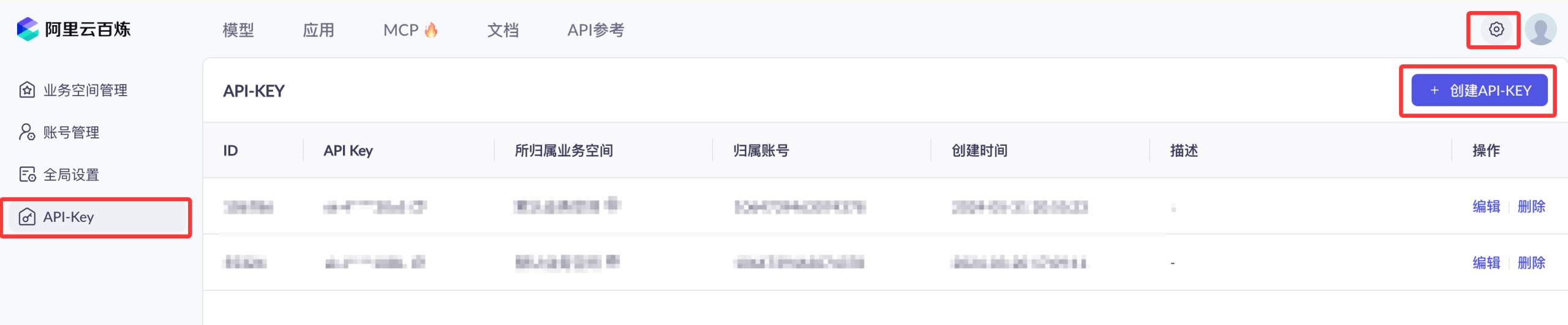
我们需要开通阿里云百炼模型服务并获得 API-KEY。
我们可以先使用阿里云主账号访问百炼模型服务平台:https://bailian.console.aliyun.com/,然后点击右上角登录,登录成功后点击右上角的齿轮⚙️图标,选择 API key,然后复制 API key,如果没有也可以创建 API key:

开通阿里云百炼不会产生费用,仅模型调用(超出免费额度后)、模型部署、模型调优会产生相应计费。
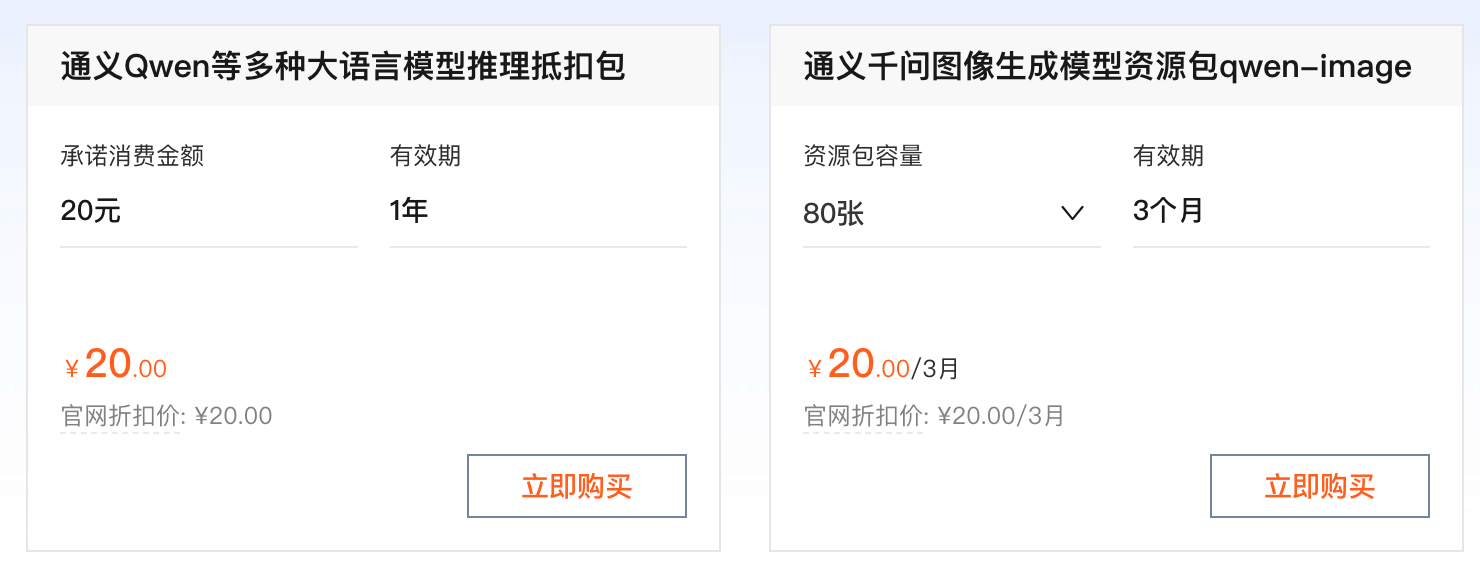
现在要使用 API,都需要按 token 来计费,还好都不贵,我们可以先购买个最便宜的包:阿里云百炼大模型服务平台。
也可以直接使用百炼的 Coding Plan 套餐:https://www.aliyun.com/benefit/scene/codingplan。
兼容 OpenAI API 协议:
- Base URL:https://coding.dashscope.aliyuncs.com/v1
- API Key:填入 Coding Plan 套餐专属 API Key
- Model:qwen3-coder-plus
使用方式
接下来我们使用 OpenAI SDK 访问百炼服务上的通义千问模型。
非流式调用示例
实例
import os
def get_response():
client = OpenAI(
api_key="sk-xxx", # 请用阿里云百炼 API Key
base_url="https://dashscope.aliyuncs.com/compatible-mode/v1", # 填写DashScope SDK的base_url
)
completion = client.chat.completions.create(
model="qwen-plus", # 此处以qwen-plus为例,可按需更换模型名称。模型列表:https://help.aliyun.com/zh/model-studio/getting-started/models
messages=[{'role': 'system', 'content': 'You are a helpful assistant.'},
{'role': 'user', 'content': '你是谁?'}]
)
# json 数据
#print(completion.model_dump_json())
print(completion.choices[0].message.content)
if __name__ == '__main__':
get_response()
运行代码可以获得以下结果:
我是通义千问,阿里巴巴集团旗下的通义实验室自主研发的超大规模语言模型。我可以帮助你回答问题、创作文字,比如写故事、写公文、写邮件、写剧本、逻辑推理、编程等等,还能表达观点,玩游戏等。如果你有任何问题或需要帮助,欢迎随时告诉我!
流式调用示例
实例
def get_response():
client = OpenAI(
api_key="sk-xxx",
base_url="https://dashscope.aliyuncs.com/compatible-mode/v1",
)
completion = client.chat.completions.create(
model="qwen-plus",
messages=[
{'role': 'system', 'content': 'You are a helpful assistant.'},
{'role': 'user', 'content': '你是谁?'}
],
stream=True,
stream_options={"include_usage": True}
)
for chunk in completion:
# chunk 里可能没有 choices 或 delta
if hasattr(chunk, "choices") and len(chunk.choices) > 0:
choice = chunk.choices[0]
if hasattr(choice, "delta") and hasattr(choice.delta, "content"):
print(choice.delta.content, end='', flush=True)
if __name__ == '__main__':
get_response()
运行代码可以获得以下结果:
我是通义千问,阿里巴巴集团旗下的通义实验室自主研发的超大规模语言模型。我可以帮助你回答问题、创作文字,比如写故事、写公文、写邮件、写剧本、逻辑推理、编程等等,还能表达观点,玩游戏等。如果你有任何问题或需要帮助,欢迎随时告诉我!
特色功能
视觉(Vision)功能
支持图片输入(URL 或 Base64 编码),实现多模态交互。
图片 URL 输入:
实例
img_url = "https://upload.wikimedia.org/wikipedia/commons/thumb/d/d5/2023_06_08_Raccoon1.jpg/1599px-2023_06_08_Raccoon1.jpg"
response = client.responses.create(
model="gpt-5.2",
input=[
{
"role": "user",
"content": [
{"type": "input_text", "text": prompt},
{"type": "input_image", "image_url": img_url},
],
}
],
)
print(response.output_text)
Base64 编码图片输入:
实例
from openai import OpenAI
client = OpenAI()
prompt = "What is in this image?"
# 读取本地图片并编码为 Base64
with open("path/to/image.png", "rb") as image_file:
b64_image = base64.b64encode(image_file.read()).decode("utf-8")
response = client.responses.create(
model="gpt-5.2",
input=[
{
"role": "user",
"content": [
{"type": "input_text", "text": prompt},
{"type": "input_image", "image_url": f"data:image/png;base64,{b64_image}"},
],
}
],
)
异步使用(Async usage)
替换 OpenAI 为 AsyncOpenAI,并通过 await 调用 API:
基础异步示例:
实例
import asyncio
from openai import AsyncOpenAI
client = AsyncOpenAI(
api_key=os.environ.get("OPENAI_API_KEY"),
)
async def main() -> None:
response = await client.responses.create(
model="gpt-5.2",
input="Explain disestablishmentarianism to a smart five year old."
)
print(response.output_text)
asyncio.run(main())
异步场景优化(aiohttp 后端),安装扩展版本:
pip install openai[aiohttp]
aiohttp 后端优化:
实例
import asyncio
from openai import DefaultAioHttpClient, AsyncOpenAI
async def main() -> None:
# 上下文管理器确保资源释放
async with AsyncOpenAI(
api_key=os.environ.get("OPENAI_API_KEY"),
http_client=DefaultAioHttpClient(), # 启用 aiohttp 后端
) as client:
chat_completion = await client.chat.completions.create(
messages=[{"role": "user", "content": "Say this is a test"}],
model="gpt-5.2",
)
asyncio.run(main())
流式响应(Streaming responses)
基于 Server Side Events (SSE) 实时获取响应,同步 / 异步接口一致。
同步流式示例:
实例
client = OpenAI()
stream = client.responses.create(
model="gpt-5.2",
input="Write a one-sentence bedtime story about a unicorn.",
stream=True, # 开启流式输出
)
for event in stream:
print(event) # 逐段打印响应
异步流式示例:
实例
from openai import AsyncOpenAI
client = AsyncOpenAI()
async def main():
stream = await client.responses.create(
model="gpt-5.2",
input="Write a one-sentence bedtime story about a unicorn.",
stream=True,
)
async for event in stream:
print(event)
asyncio.run(main())
实时 API(Realtime API)
低延迟多模态对话(文本 / 音频),基于 WebSocket 实现,依赖 websockets 库。
基础文本示例:
实例
from openai import AsyncOpenAI
async def main():
client = AsyncOpenAI()
# 建立实时连接
async with client.realtime.connect(model="gpt-realtime") as connection:
# 更新会话配置(仅输出文本)
await connection.session.update(
session={"type": "realtime", "output_modalities": ["text"]}
)
# 发送用户消息
await connection.conversation.item.create(
item={
"type": "message",
"role": "user",
"content": [{"type": "input_text", "text": "Say hello!"}],
}
)
# 触发模型响应
await connection.response.create()
# 监听实时事件
async for event in connection:
if event.type == "response.output_text.delta":
print(event.delta, flush=True, end="") # 实时打印文本片段
elif event.type == "response.output_text.done":
print() # 响应结束换行
elif event.type == "response.done":
break # 终止监听
asyncio.run(main())
实时 API 错误处理:
实例
from openai import AsyncOpenAI
client = AsyncOpenAI()
async def main():
async with client.realtime.connect(model="gpt-realtime") as connection:
async for event in connection:
if event.type == 'error':
# 捕获并处理错误事件(连接不会断开)
print(f"错误类型:{event.error.type}")
print(f"错误码:{event.error.code}")
print(f"错误信息:{event.error.message}")
asyncio.run(main())
参考手册
以下表格包含的内容为:
- 核心初始化:同步用
OpenAI、异步用AsyncOpenAI、Azure 用AzureOpenAI,推荐通过环境变量配置 API Key。 - 文本生成:新版优先用
responses.create(),经典场景用chat.completions.create(),流式输出需设置stream=True。 - 高级能力:支持多模态(图片输入)、实时 API、文件上传/微调,错误处理需捕获
APIError子类,超时/重试可灵活配置。
安装与导入
安装官方 SDK:
pip install --upgrade openai
导入核心类:
from openai import OpenAI, AsyncOpenAI, AzureOpenAI
创建客户端
创建标准 OpenAI 客户端:
from openai import OpenAI

client = OpenAI(api_key="YOUR_API_KEY")
通过环境变量创建客户端:
import os
from openai import OpenAI

os.environ["OPENAI_API_KEY"] = "YOUR_API_KEY"
client = OpenAI()
设置请求超时与重试次数:
client = OpenAI(
    timeout=30,
    max_retries=2
)
文本生成(Responses API)
最基础的文本生成请求:
response = client.responses.create(
    model="gpt-5.2",
    input="用一句话解释什么是 Python"
)

print(response.output_text)
通过 instructions 约束模型行为:
response = client.responses.create(
    model="gpt-5.2",
    instructions="你是一个严谨的 Python 教程作者",
    input="解释什么是列表推导式"
)

print(response.output_text)
多轮对话
使用 input 数组构建上下文对话:
response = client.responses.create(
    model="gpt-5.2",
    input=[
        {"role": "user", "content": "Python 是什么?"},
        {"role": "assistant", "content": "Python 是一门高级编程语言。"},
        {"role": "user", "content": "它适合做什么?"}
    ]
)

print(response.output_text)
结构化输出(JSON Schema)
要求模型返回符合 Schema 的 JSON 数据:
response = client.responses.create(
    model="gpt-5.2",
    response_format={
        "type": "json_schema",
        "json_schema": {
            "name": "tech_summary",
            "schema": {
                "type": "object",
                "properties": {
                    "title": {"type": "string"},
                    "summary": {"type": "string"}
                },
                "required": ["title", "summary"]
            }
        }
    },
    input="介绍 asyncio"
)

print(response.output_parsed)
工具调用(Function Calling)
定义工具并让模型自动决定是否调用:
tools = [
    {
        "type": "function",
        "function": {
            "name": "get_weather",
            "description": "获取城市天气",
            "parameters": {
                "type": "object",
                "properties": {
                    "city": {"type": "string"}
                },
                "required": ["city"]
            }
        }
    }
]

response = client.responses.create(
    model="gpt-5.2",
    tools=tools,
    input="北京今天天气怎么样?"
)

print(response.output)
流式输出(Streaming)
同步流式输出:
with client.responses.stream(
    model="gpt-5.2",
    input="写一段 Python 示例代码"
) as stream:
    for event in stream:
        if event.type == "response.output_text.delta":
            print(event.delta, end="")
异步流式输出:
stream = await client.responses.create(
    model="gpt-5.2",
    input="解释什么是生成式 AI",
    stream=True
)

async for event in stream:
    print(event)
异步调用(AsyncOpenAI)
在 asyncio 中使用异步客户端:
import asyncio
from openai import AsyncOpenAI

client = AsyncOpenAI()

async def main():
    response = await client.responses.create(
        model="gpt-5.2",
        input="解释什么是事件循环"
    )
    print(response.output_text)

asyncio.run(main())
实时 API(Realtime)
使用 WebSocket 进行低延迟实时对话:
async with client.realtime.connect(model="gpt-realtime") as conn:
    await conn.session.update(
        session={"type": "realtime", "output_modalities": ["text"]}
    )

    await conn.conversation.item.create(
        item={
            "type": "message",
            "role": "user",
            "content": [{"type": "input_text", "text": "你好"}]
        }
    )

    async for event in conn:
        print(event)
图像生成
根据文本生成图片:
image = client.images.generate(
    model="gpt-image-1",
    prompt="一只在写代码的猫",
    size="1024x1024"
)

print(image.data[0].url)
嵌入生成(Embeddings)
生成文本向量嵌入:
embedding = client.embeddings.create(
    model="text-embedding-3-small",
    input="Hello world"
)

print(embedding.data[0].embedding)
音频转文本(Speech to Text)
将音频文件转为文字:
audio_file = open("speech.mp3", "rb")

transcript = client.audio.transcriptions.create(
    model="whisper-1",
    file=audio_file
)

print(transcript.text)
文本转语音(Text to Speech)
将文本转换为语音文件:
speech = client.audio.speech.create(
    model="gpt-4o-mini-tts",
    voice="alloy",
    input="你好,欢迎使用 OpenAI"
)

with open("output.mp3", "wb") as f:
    f.write(speech)
文件管理(Files API)
上传文件:
from pathlib import Path

client.files.create(
    file=Path("data.jsonl"),
    purpose="fine-tune"
)
列出文件:
files = client.files.list()
for f in files:
    print(f.id, f.filename)
删除文件:
client.files.delete(file_id="file-xxx")
模型微调(Fine-tuning Jobs)
创建微调任务:
job = client.fine_tuning.jobs.create(
    training_file="file-xxx",
    model="gpt-3.5-turbo"
)

print(job.id, job.status)
Webhook 验证
验证并解析 Webhook 请求:
event = client.webhooks.unwrap(request_body, request_headers)
仅验证签名:
client.webhooks.verify_signature(request_body, request_headers)
错误处理
捕获 SDK 抛出的异常:
import openai

try:
    client.responses.create(
        model="gpt-5.2",
        input="test"
    )
except openai.RateLimitError as e:
    print("触发速率限制:", e)
except openai.APIConnectionError as e:
    print("连接失败:", e)
获取失败请求的 Request ID:
try:
    client.responses.create(model="gpt-5.2", input="test")
except openai.APIStatusError as exc:
    print(exc.request_id)
Azure OpenAI 兼容
初始化 Azure OpenAI 客户端:
from openai import AzureOpenAI

client = AzureOpenAI(
    api_version="2023-07-01-preview",
    azure_endpoint="https://xxx.openai.azure.com"
)
版本与日志
查看 SDK 版本:
import openai
print(openai.__version__)
开启 SDK 调试日志:
export OPENAI_LOG=debug
更多 API 参考:https://github.com/openai/openai-python/blob/main/api.md

点我分享笔记